⚠️Note⚠️
The Mod is currently in development.
Mosaik Vanilla Client Enhancements (MVCE) is a client-side Fabric mod for Minecraft 26.2 that brings several practical improvements together in one lightweight package. It improves window handling, adds shared in-game pings, and provides a safe way to manage map data from the main menu.
Features
Improved Window Management
- Toggle borderless fullscreen with a configurable keybind (F10 by default).
- Automatically use the monitor on which Minecraft is currently running.
- Restore the previous window position and size when leaving borderless mode.
- Keep Minecraft’s normal F11 fullscreen behavior unchanged.
- Apply the Windows dark title bar correctly on Windows 11.
- Use Java 25’s native Foreign Function & Memory API, without bundling JNA or an additional native DLL.
Borderless fullscreen uses Minecraft’s existing GLFW window and is not limited to Windows. Only the dark title-bar integration is Windows-specific.
Shared Ping System
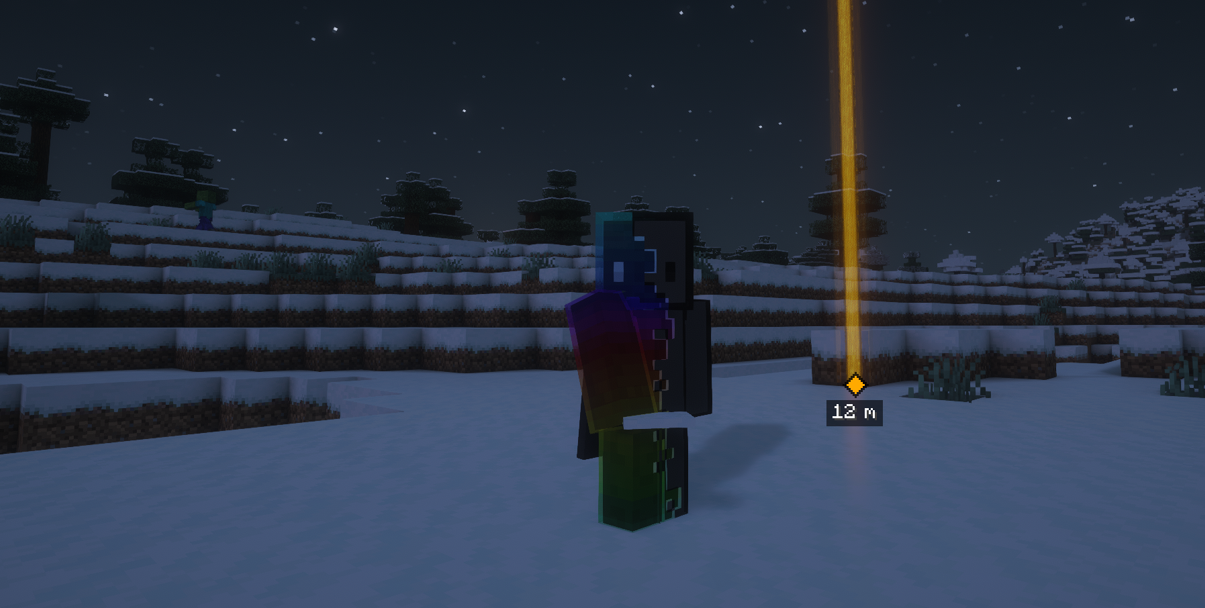
Place a world-anchored ping at the block or point you are looking at with the middle mouse button. Other players using MVCE can immediately see the ping when the accompanying server plugin is installed.
- Shows the sender’s name and distance.
- Keeps off-screen and behind-camera pings visible with edge indicators.
- Adds a translucent, color-matched beacon beam and a short fade-out.
- Plays a directional vanilla sound from the ping’s location.
- Uses the player’s current vanilla waypoint color when available.
- Synchronizes pings only with participating players in the same world.
- Validates coordinates, range, permissions, and cooldowns on the server.
- Supports distances of up to 500 metres by default.
- Runs safely on Folia’s region-threaded scheduler.
Shared multiplayer pings require the included mve_addon_ping plugin on the Folia server. If the plugin is missing, MVCE warns the player instead of silently failing.
Map Data Manager
A compact button next to Minecraft’s social and Mod Menu buttons opens the map-data manager. The button uses the MVCE logo and only appears when Xaero’s World Map, Distant Horizons, or both are installed.
The screen uses transparent, server-list-style entries, separate source tabs, and a search field similar to Minecraft’s Select World screen. Only tabs for installed supported mods are shown.
Xaero World Map and Minimap
- Lists saved maps from
.minecraft/xaero/world-map. - Distinguishes between singleplayer worlds and multiplayer servers.
- Removes the technical
Multiplayer_prefix from displayed server names. - Shows the original folder name as additional information.
- Filters entries by name, folder, or world type.
- Deletes the selected World Map folder and the equally named Xaero Minimap folder together.
Distant Horizons
- Lists multiplayer LOD data from
.minecraft/Distant_Horizons_server_data. - Provides the same searchable, tabbed interface and confirmation workflow.
- Only appears when Distant Horizons is installed.
Every deletion requires explicit confirmation. MVCE validates that the selected folder is a direct child of the expected data directory and refuses unsafe or external paths. Deleted map and LOD data cannot be recovered unless you have a backup.
Optional Mod Menu Integration
When Mod Menu 20.0.0 or newer is installed, the MVCE entry provides a configuration screen where players can independently enable or disable:
- All pings
- The translucent beacon effect
- Directional ping sounds
These settings persist in .minecraft/config/mvce.json. The Mod Menu entry also links directly to the MVCE website and support/comments page.
Controls
- F10: Toggle borderless fullscreen.
- Middle Mouse Button: Create a ping at the block or point you are looking at.
- F7: Enable or disable pings on blocks selected by Minecraft’s normal outline. Free-space and distant pings remain available while this is disabled.
All MVCE controls are listed in Minecraft’s key-bind settings and can be reassigned by the player.
Requirements
- Minecraft 26.2
- Fabric Loader 0.19.3 or newer
- Fabric API 0.156.0+26.2
- Java 25 or newer
Windows 11 is required only for the dark title-bar fix. Xaero’s World Map, Xaero’s Minimap, Distant Horizons, and Mod Menu are optional integrations and are not required for the core window features.
Installation
- Install Fabric Loader for Minecraft 26.2.
- Install Fabric API.
- Place the MVCE JAR in your
.minecraft/modsfolder. - Launch the game.
Enabling Shared Pings on a Folia Server
- Install MVCE on every participating player’s Fabric client.
- Place
mve_addon_ping-<version>.jarin the server’spluginsfolder. - Restart the server. Do not use
/reload.
The server plugin creates plugins/mve_addon_ping/config.yml, where administrators can configure ping lifetime, player cooldown, and maximum range. The mvce.ping permission is granted to all players by default.